What I needed
Long scraping jobs need IP addresses that look like ordinary mobile users. Renting them is expensive, and shared pools are often already flagged. LTE dongles are cheap, and each one gets a new carrier IP when it reboots. So the idea was simple: put several dongles on a Raspberry Pi, put a proxy in front of each, and reboot them in turn.
What made it hard
Rebooting a dongle doesn’t just change its IP. It disappears from the Pi as a network device, its DHCP lease goes, and the routes that send traffic through it break. Handled carelessly, one rotation can leave that modem unreachable, and a sloppy route change can push traffic for every modem through the wrong one.
How it works
clients --> HAProxy :41234  (TCP, round-robin, health checks)
               |  admin socket: drain / ready / add / remove modem
               v
         3proxy 127.0.0.1:8081..808N   one listener per modem,
               |                       bound to that modem's local IP
               |  ip rule: from <local IP> -> routing table modemN
               v
   eth1..ethN (USB) --> Huawei HiLink dongle 192.168.N.1 --> LTE carrier

Go daemon (systemd):
  scheduler  - polls HAProxy stats every 3s, queues modems that served traffic
  rotation   - reboot via HiLink API, ordered recovery (below)
  REST API   - list modems, add/remove, rotate/recover on demand
One routing table per modem. Each dongle sits on its own subnet (a small helper script moves each one off the factory 192.168.8.1). Each 3proxy listener binds to that modem’s local address, and a Linux policy rule sends traffic from that address out through that modem’s table. Traffic for exit 2 always leaves through SIM 2.
An ordered recovery after every reboot. The rotation doesn’t just reboot and hope. It waits for each layer in turn:
- Drain the modem from HAProxy, but only if another modem is online to carry traffic.
- Get a session token from the dongle’s web API and send the reboot command.
- Wait 15 seconds for it to power down, then poll its web server (up to 60 seconds), requesting a DHCP lease on any interface that came back without an address.
- Poll the dongle’s connection status until it reports connected (code 901), up to 60 seconds.
- Re-add the default route and source rule for that modem’s table.
- Rewrite the 3proxy config, and restart 3proxy only if the file actually changed.
- Mark the modem ready in HAProxy again.
[scheduler] Rotating modem2 for fresh IP (queue len after: 1)
[modem2] Waiting 15s for hardware to power down...
[modem2] Polling modem web server...
[modem2] Modem web server UP.
[modem2] Waiting for LTE connection...
[modem2] LTE connected.
[modem2] Rotation complete.
Rotate only what was used. The scheduler reads HAProxy’s session counters. A modem joins the rotation queue only after it has actually served traffic, idle entries drop out after five minutes, and the scheduler starts at most one rotation at a time.
Keeping network recovery under control
In the first week, the Pi slowly filled up with dhclient processes. The boot-wait loop polls every 3 seconds, and on each poll it asked for a DHCP lease on any interface without an address. Without the -1 flag, a dhclient that can’t get a lease straight away keeps retrying in the background. Every poll left one more behind.
The fix was dhclient -1, which tries once and exits, in all four places it’s called. The same commit removed a fixed “wait 5 seconds for LTE” guess and replaced it with the real connection-status check above. The first version of the whole thing was a bash script that edited the proxy config with sed and restarted it on every rotation; the Go daemon replaced it two days later.
Deployment fit
This setup is designed for a private network. An external-facing installation needs authenticated proxy access and firewall rules. Recovery checks the modem connection and restores its network path; public IP assignment remains under the mobile carrier’s control.
In pictures
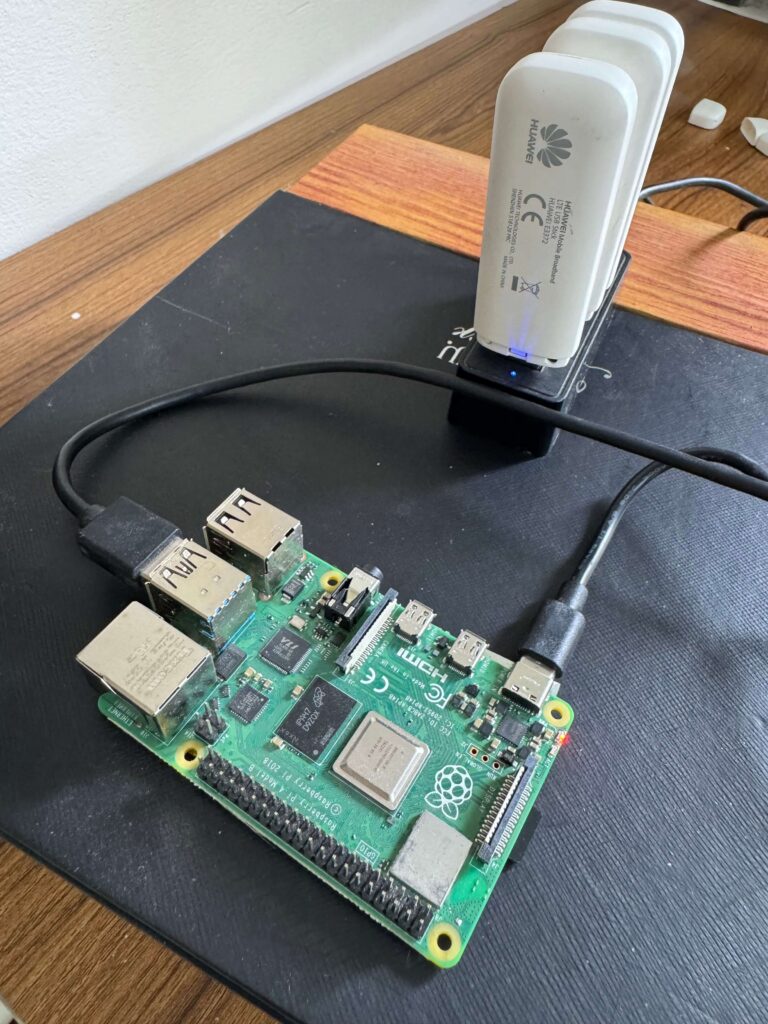
Proof
Personal infrastructure project, open source
- Open source on GitHub (Go, no external dependencies) with a detailed README covering architecture, request flow and troubleshooting.
- Self-healing rotation: one modem at a time, and only modems that carried traffic.
- The photo above is the real build.
Good to know
- Run it behind a firewall or VPN; the proxy endpoint is not meant for the open internet.
- Designed for a single-Pi setup; larger deployments would add redundancy.
- Automated tests and further hardening of rotation failure handling are the next planned improvements.