
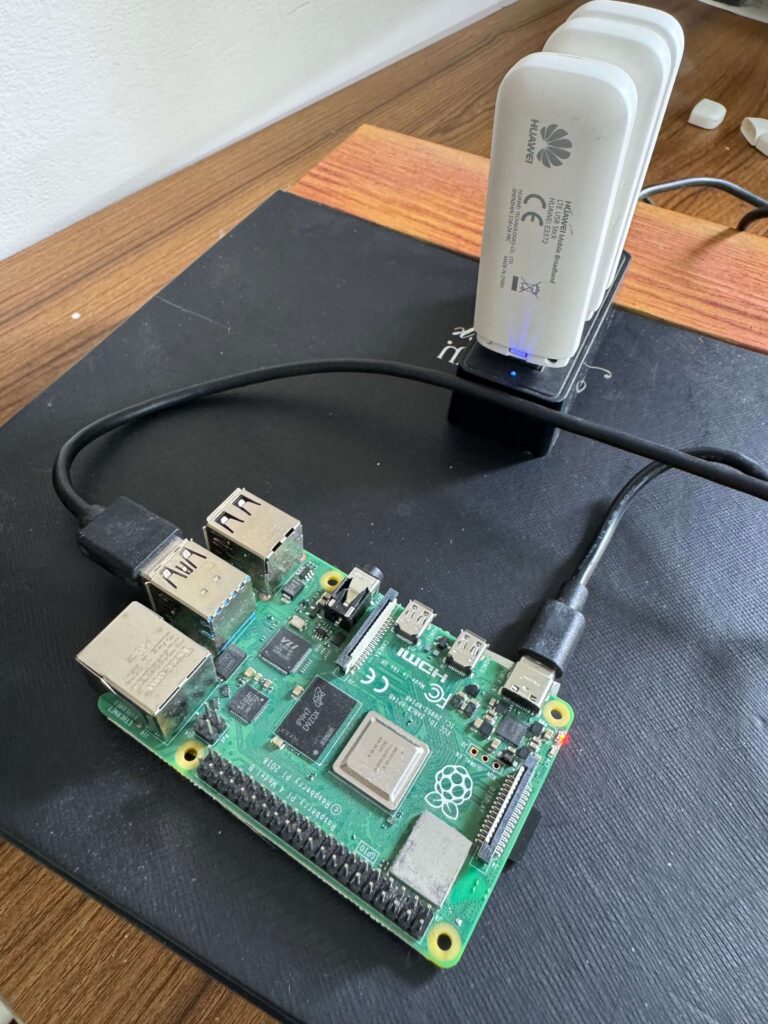
How I Built a Self-Healing Mobile Proxy Farm with a Raspberry Pi and Go
If you have ever tried to scrape data at scale, you know how crucial a reliable mobile proxy farm is. First, you write a beautiful scraper and deploy it. However, within an hour, Cloudflare or Datadome slaps you with a 403 Forbidden error. Consequently, your datacenter IPs are burned.
The solution? Mobile proxies. I built my own farm for a fraction of the cost of enterprise proxy providers. Furthermore, I have open-sourced the entire project.
In this post, I will show you how I built a production-grade, self-healing mobile proxy farm. I used a Raspberry Pi, 3 Huawei 4G USB modems, and a custom orchestrator written in Go. Specifically, we will dive deep into Linux networking, reverse-engineering undocumented hardware APIs, and zero-downtime load balancing.
Why Mobile Proxies? (The Magic of CGNAT)
Mobile carriers use a technology called Carrier-Grade NAT (CGNAT). Since we have run out of IPv4 addresses, mobile carriers do not give your smartphone a dedicated public IP. Instead, hundreds or thousands of mobile users share a single public IP at the exact same time.
Anti-bot systems factor this into their risk scoring. Therefore, mobile IPs receive significantly higher trust. If a security system outright bans a mobile IP, they risk simultaneously blocking a few hundred legitimate users.
If we buy a few 4G USB modems and stick SIM cards in them, we can reboot them to get new IPs. The mobile carrier assigns us a brand-new, highly-trusted public IP every time. Do this in an automated loop, and you instantly have a massive pool of pristine IPs.
The Hardware
Here is exactly what you need to build this:
* 1x Raspberry Pi 4 (4GB RAM is plenty).
* 3x Huawei E3372h 4G LTE USB Modems (Configure these in “HiLink” mode so they act as USB ethernet adapters).
* SIM Cards with unlimited or high-data plans.
* A Powered USB Hub (Crucial: A Pi 4 can only supply 1.2 Amps across all USB ports. Meanwhile, each modem can spike up to ~0.9A under heavy LTE load. Do not skip the powered hub!)
Note: To avoid overwhelming the USB bus power budget at boot, the Go daemon intentionally staggers the modem startup sequences by 15 seconds each.
Mobile Proxy Farm Architecture: How It All Fits Together
When you plug multiple modems into a Linux machine, things get chaotic quickly. We need a secure way to route traffic precisely and swap modems out when they need a new IP.
Here is the high-level architecture of our custom mobile proxy farm:
Let’s break down the three distinct layers of this stack.
1. The Router (HAProxy)
We do not want our scraping script to manually manage a list of proxy IP addresses and handle failures. Instead, we want a single endpoint.
Therefore, HAProxy sits at the front, listening on port 41234 in TCP mode. It blindly accepts SOCKS5 or HTTP proxy traffic. Then, it round-robins the requests across our backend tunnels.
2. The Tunnels (3proxy)
We run an instance of 3proxy for every modem attached to the Pi.
For example, if modem1 is assigned the local IP 192.168.69.100 by its internal DHCP, we tell 3proxy to bind its external interface exclusively to that IP. This ensures that traffic entering port 8081 must exit through modem1.
Engineering detail: The Go daemon dynamically regenerates the 3proxy config after every rotation. However, it smartly compares the new config against the existing file. Consequently, it skips the 3proxy restart if nothing changed (since DHCP tends to renew the same lease).
3. The Brain (Go Daemon)
This is where the magic happens. A custom Go daemon runs as a systemd service. First, it monitors HAProxy to see which modems are actively serving traffic. Next, it orchestrates the reboot cycles to get new IPs. Finally, it completely manages the complex Linux routing tables.
Engineering Challenge #1: Taming Linux Routing Tables
By default, Linux is completely dumbfounded if you give it three different default gateways (the three modems). If you do not intervene, a request comes into eth2, but Linux might route the outbound traffic through eth1. Ultimately, this results in a dropped connection or an IP leak.
To solve this, our Go daemon dynamically creates Policy-Based Routing (PBR) tables for every modem as they come online.
(Prerequisite: You must first merge your custom routing table names into /etc/iproute2/rt_tables so Linux recognizes them).
Whenever a modem boots, the Go daemon discovers its IP and executes:
# Create a dedicated routing table for Modem 1 (Suppressing errors if it exists)
ip route add default via 192.168.69.1 dev eth1 table modem1 2>/dev/null || true
# Force any traffic originating from Modem 1's IP to strictly use that table
ip rule add from 192.168.69.100 table modem1 2>/dev/null || true
This guarantees absolute network isolation. In short, what goes into modem1, exits through modem1‘s carrier network.
Engineering Challenge #2: Zero-Downtime IP Rotation
When we reboot a modem to get a new IP, it goes offline. If HAProxy sends a request to that modem during this window, the scraper fails.
To achieve zero downtime, the Go daemon communicates directly with the HAProxy Unix socket (/run/haproxy/admin.sock).
Before the daemon reboots a modem, it sends this exact command to HAProxy:
set server proxy_nodes/modem1 state maint
This instantly puts the modem into maintenance mode. As a result, HAProxy gracefully finishes existing connections but stops routing new traffic to it.
Once the modem reboots, connects to LTE, and gets a new public IP, the Go daemon verifies the connection. After that, it sends:
set server proxy_nodes/modem1 state ready
The scraper client remains completely oblivious. It just keeps firing requests at the single endpoint, never experiencing a dropped connection.
Engineering Challenge #3: The Traffic-Aware Scheduler
The naive way to rotate IPs is a simple cron job that reboots modems every 10 minutes. But what if a modem was idle? You just wasted a reboot cycle. Conversely, what if a modem served 1,000 requests in 1 minute? Its IP is heavily used and needs immediate rotation.
To fix this, I wrote an “Escalator-style” FIFO scheduler in Go that polls HAProxy stats every 3 seconds.
First, it parses the HAProxy CSV output to track stot (total sessions). If stot increases, the daemon knows the modem just handled traffic. Consequently, it gets pushed into the rotation queue. Modems are rotated fairly (FIFO) one at a time.
Smart detail: The scheduler includes an idle drain mechanism. If a modem sits in the queue for more than 5 minutes without any new traffic, the system automatically drops it from the queue. This prevents unnecessary rotations.
Hardware Hacking: Reverse Engineering the Huawei XML API
The biggest hurdle was figuring out how to actually reboot the modems programmatically. Physically unplugging them was clearly not an option.
Huawei HiLink modems run a lightweight web server for their user interface. However, the API is entirely undocumented. By inspecting network traffic while clicking “Reboot” in the browser UI, I uncovered their internal XML API.
It is locked down with a dual-token authentication system. To reboot the modem, our Go daemon has to perform this specific handshake:
- Fetch Tokens: Make a
GETrequest to/api/webserver/SesTokInfoto extract aSessionID(cookie) and a__RequestVerificationToken. - Send Payload: Send a
POSTrequest to/api/device/controlwith the tokens attached, alongside an XML payload of<request><Control>1</Control></request>.
Here is a quick snippet of how it looks in Go:
func (m *Modem) sendRebootCommand(session, token string) error {
    url := fmt.Sprintf("http://%s/api/device/control", m.GatewayIP)
    payload := strings.NewReader(`<?xml version="1.0" encoding="UTF-8"?><request><Control>1</Control></request>`)

    req, _ := http.NewRequest("POST", url, payload)
    req.Header.Set("Cookie", session)
    req.Header.Set("__RequestVerificationToken", token)
    req.Header.Set("Content-Type", "text/xml")

    client := &http.Client{Timeout: 5 * time.Second}
    resp, err := client.Do(req)
    // ... error handling
    return nil
}
Once the command is sent, the modem physically power-cycles. Then, the daemon polls /api/monitoring/status until the ConnectionStatus hits 901 (LTE Connected). Finally, it recovers the routing tables and puts it back into HAProxy.
In my testing, total rotation time averages ~43 seconds, though this varies slightly by carrier.
The REST API & Self-Healing
To make this truly production-grade, I built a fully authenticated REST API into the daemon. All endpoints are protected via a Bearer token if API_SECRET_KEY is set in the environment.
Here are the available endpoints you can use to control the proxy farm on the fly:
Modem Management
– GET /api/modems – Lists all connected modems, their current IP addresses, connection status, and rotation settings.
– POST /api/modems – Hot-adds a new modem to the rotation pool without restarting the daemon.
– DELETE /api/modems/{id} – Removes a modem from the rotation pool and safely drains its connections.
Rotation & Recovery Controls
– POST /api/modems/{id}/rotate – Triggers an immediate manual rotation (reboot) for a specific modem.
– POST /api/modems/{id}/recover – Triggers network recovery for a specific modem (rebuilds Linux routing tables without a hard reboot). Perfect for recovering from hot-plug events.
– POST /api/modems/{id}/rotation/enable – Enables auto-rotation for a specific modem.
– POST /api/modems/{id}/rotation/disable – Disables auto-rotation for a specific modem.
– POST /api/rotation/enable – Globally enables auto-rotation for the entire farm.
– POST /api/rotation/disable – Globally disables auto-rotation for the entire farm.
(Note: There are also a few legacy GET endpoints like /api/rotate kept around for backward compatibility with older scrapers).
Between the automatic traffic-aware scheduler and these recovery APIs, the system is remarkably self-healing.
Scaling Up: From Hobby to Enterprise
If you are looking at this and thinking, “I need 500 IPs, I’ll just buy a massive 50-port USB hub,” you need to reconsider. Vertical scaling on a single machine hits three brutal physical bottlenecks:
- USB Bus Saturation: A Raspberry Pi routes its USB ports through a single internal PCIe lane. Beyond 5-10 modems, the USB bus chokes. Even if you upgrade to a powerful Mini PC, daisy-chaining USB hubs in Linux eventually leads to driver instability and dropped packets.
- RF (Radio Frequency) Interference: Sticking 50 LTE antennas next to each other on a desk creates a massive noise floor. They will destructively interfere with each other, destroying your signal quality and bandwidth.
- Cell Tower Saturation: If 50 SIM cards from the same carrier connect from the exact same physical GPS coordinate, the local cell tower will flag the unnatural load. The carrier’s QoS algorithms will aggressively throttle or disconnect your fleet.
The Solution: Distributed Micro-Nodes
Enterprise proxy providers do not build giant single servers. Instead, they build distributed networks. You should treat this Raspberry Pi setup as the blueprint for a Micro-Node.
To scale to enterprise levels, you build 10 of these exact Pi nodes (or cheap Mini PCs) and distribute them geographically. Put one in your office, one at a friend’s house, and one in a different city. This naturally solves RF interference, spreads your load across multiple cell towers, and gives your proxy pool geographical diversity.
Conclusion & Limitations
Building your own mobile proxy farm requires a bit of upfront work. Nevertheless, the payoff is absolutely massive. By combining the raw power of HAProxy with the concurrency of Go, we created a robust system that effortlessly slices through anti-bot measures.
Of course, it has limitations. For instance, you are bound by the physical constraints of USB power scaling. Furthermore, the carriers can still throttle your SIMs if you abuse them. Finally, this specific implementation targets Huawei HiLink modems exclusively. However, for moderate to heavy scraping, it runs flawlessly for weeks on end.
If you want to build this yourself or extend it to support other hardware:
👉 Check out the GitHub Repository Here 👈
Feel free to open an issue, submit a PR, or poke around the code.
If you want to read more about my other engineering projects and experiments, check out my home page.